Getting a website online is only the first step. If search engines cannot understand your pages, and users cannot quickly find what they need, even a well-designed website can struggle to generate organic traffic.
This is where on-page SEO comes in.
On-page SEO is the process of optimizing the elements on your website so that search engines can understand your content and users can find it useful. It includes everything from keywords, page titles, headings, URLs, and internal links to content quality, images, page experience, and search intent.
For businesses, effective on-page SEO is not about adding keywords everywhere. It is about making every important page clear, relevant, useful, and easy to understand.
In this guide, we’ll explain what on-page SEO is, why it matters, which elements you should optimize, and how to build an effective on-page SEO process.
What Is On-Page SEO?
On-page SEO refers to the optimization of individual webpages to improve their visibility in search engines and provide a better experience for visitors.
Unlike off-page SEO, which focuses on external signals such as backlinks, on-page SEO deals primarily with what is on your website.
This can include:
- Keyword targeting
- Page titles
- Meta descriptions
- URL structure
- Headings
- Content
- Internal linking
- Image optimization
- Mobile usability
- Page speed
- Search intent
- Structured data
- User experience
The goal is simple: help search engines understand the page and help users get the information they are looking for.
Why Is On-Page SEO Important?
Search engines need to determine what a webpage is about before deciding where it should appear for relevant searches.
A page might contain valuable information, but if its topic, structure, and relevance are unclear, it may not perform as well as it could.
Good on-page SEO helps you:
1. Improve Search Visibility
Optimizing important page elements makes it easier for search engines to understand the topic and relevance of your content.
2. Target the Right Keywords
Instead of trying to rank one page for dozens of unrelated keywords, on-page SEO helps you build pages around specific topics and search intent.
3. Improve User Experience
SEO and user experience are closely connected. Clear headings, logical navigation, readable content, fast-loading pages, and useful information make it easier for visitors to interact with your website.
4. Increase Organic Traffic
Better visibility for relevant searches can bring more qualified visitors to your website without relying entirely on paid advertising.
5. Support Conversions
Traffic alone is not the objective.
A well-optimized service page should guide visitors toward the next action, whether that means making an enquiry, requesting a quote, booking a consultation, or purchasing a product.
12 Important On-Page SEO Elements
1. Search Intent
Before optimizing a page, understand why someone is searching.
For example, someone searching for:
“what is web hosting”
is probably looking for educational information.
Someone searching for:
“web hosting services in India”
may be comparing providers.
And someone searching for:
“buy WordPress hosting”
has much stronger commercial or transactional intent.
Your content should match that intent.
If the searcher wants a guide, provide a guide. If they are looking for a service, make the service page clear and conversion-focused.
This is one of the most important principles of modern SEO.
2. Keyword Research
Keywords provide search engines with context about the subject of your page.
However, effective keyword optimization is not about repeating the same keyword dozens of times.
Start by identifying:
- Primary keyword
- Secondary keywords
- Related terms
- Long-tail keywords
- Questions users ask
- Commercial keywords
- Location-specific keywords where relevant
For example, a web design company could target terms such as:
- web design services
- website development company
- responsive web design
- business website development
- ecommerce website development
The keywords should naturally fit the page rather than being forced into every paragraph.
For businesses building a broader organic strategy, keyword research should also influence the website’s content architecture.
3. SEO-Friendly Page Titles
The title tag is one of the most important on-page elements.
It helps search engines understand the subject of a page and can influence whether a user chooses your result in the search results.
A good title should:
- Clearly describe the page
- Include the primary keyword where appropriate
- Match search intent
- Be specific
- Encourage clicks without being misleading
For example:
Poor:
Services
Better:
Web Design & Development Services for Businesses | WebDreams
The second title gives both search engines and users much more context.
4. Meta Descriptions
A meta description provides a short summary of the webpage.
Although meta descriptions are not generally considered a direct ranking factor, they can influence how users perceive your result and whether they click it.
A useful meta description should:
- Explain what the page offers
- Include the primary topic naturally
- Communicate a benefit
- Encourage an appropriate action
Avoid stuffing keywords into the description simply for SEO.
Write it for the person who will see it in the search results.
5. Use a Logical Heading Structure
Headings make content easier to understand for both users and search engines.
A typical structure might look like:
H1: On-Page SEO: A Practical Guide
H2: What Is On-Page SEO?
H2: Why Is On-Page SEO Important?
H2: Important On-Page SEO Elements
H3: Keyword Research
H3: Page Titles
H3: Internal Linking
H2: On-Page SEO Checklist
The H1 should communicate the main topic of the page.
H2s and H3s should then organize supporting topics logically.
Don’t choose headings simply because they contain keywords. Choose them because they make the page easier to navigate.
6. Create Useful, Relevant Content
Content remains at the center of on-page SEO.
But “more content” does not automatically mean “better SEO.”
A 3,000-word article that takes 1,000 words to answer a simple question is not necessarily better than a concise, useful 1,000-word article.
Good content should:
- Answer the user’s question
- Provide original value
- Demonstrate knowledge of the subject
- Be easy to read
- Cover important subtopics
- Avoid unnecessary repetition
- Provide clear next steps
Think beyond keywords.
Ask:
“If I were the searcher, would this page actually solve my problem?”
If the answer is yes, you’re moving in the right direction.
7. Optimize URLs
A clean URL helps users and search engines understand what a page is about.
For example:
Poor:
example.com/page?id=4587
Better:
example.com/on-page-seo-guide/
Good URLs are generally:
- Short
- Descriptive
- Easy to read
- Relevant to the page
- Free from unnecessary parameters
If appropriate, include the primary topic or keyword naturally.
8. Use Internal Links Strategically
Internal linking is one of the most underused parts of SEO.
An internal link connects one page on your website to another page on the same website.
For example, if you’re discussing the importance of website structure, you could naturally link readers to your web design and development services page.
Internal links can help:
- Users discover relevant content
- Search engines discover pages
- Distribute authority throughout your website
- Establish relationships between topics
- Strengthen important service pages
- Improve website navigation
Don’t just add links randomly
The best internal links are contextually relevant.
For example, within an article about SEO, a sentence such as:
“Technical improvements are also important for creating a website that search engines can crawl and users can navigate efficiently.”
could naturally link to a relevant web development service page.
Your internal linking strategy should connect:
Blog content → Related blog content → Relevant service page → Conversion page
This creates a stronger website structure while also helping users move through the buying journey.

9. Optimize Images
Images can improve content, but poorly optimized images can slow down your website.
For better image SEO:
- Use descriptive file names
- Add meaningful alt text where appropriate
- Compress large images
- Use modern image formats when suitable
- Avoid unnecessarily large dimensions
- Ensure images work well on mobile devices
For example:
Poor filename:
IMG_92837.jpg
Better:
on-page-seo-checklist.jpg
Alt text should describe the image when the image conveys meaningful information. It should not be used as a place to stuff keywords.
10. Improve Page Speed and Core Web Vitals
A slow website creates friction.
Users expect pages to load quickly, especially on mobile devices.
Page experience involves several technical factors, including:
- Loading performance
- Responsiveness
- Visual stability
- Mobile usability
- HTTPS
- Interstitials and intrusive elements
Google’s Core Web Vitals provide useful metrics for understanding important aspects of real-world page experience.
SEO teams should therefore work closely with developers when optimizing websites.
Content optimization alone cannot compensate for a technically poor website.
11. Make Your Pages Mobile-Friendly
A large portion of website traffic comes from mobile devices.
A page that looks good on a desktop but becomes difficult to use on a smartphone can lose visitors and potential customers.
Check that:
- Text is readable
- Buttons are easy to tap
- Navigation works properly
- Images scale correctly
- Forms are usable
- Content does not overflow horizontally
- Important information appears clearly on smaller screens
Mobile optimization should be considered during website development, not added as an afterthought.
12. Add Structured Data Where Appropriate
Structured data helps provide search engines with additional information about certain types of content.
Depending on your website, structured data may be relevant for things such as:
- Articles
- Products
- Organizations
- Local businesses
- Events
- FAQs
- Breadcrumbs
Structured data does not guarantee enhanced search results, but implementing valid and relevant schema can help search engines better understand eligible content.
Only use structured data that accurately represents the content on the page.
On-Page SEO vs Off-Page SEO
On-page and off-page SEO work together, but they focus on different areas.
| On-Page SEO | Off-Page SEO |
|---|---|
| Page content | Backlinks |
| Keywords | Brand mentions |
| Titles | Digital PR |
| Headings | External authority |
| Internal links | Link building |
| URLs | Online reputation |
| Images | External signals |
| Technical page elements | Outreach |
A website can have strong backlinks but weak on-page SEO.
Likewise, a perfectly optimized website may struggle to compete for highly competitive keywords without sufficient authority.
A successful SEO strategy usually needs both.
On-Page SEO Checklist
Before publishing or updating a page, run through this checklist:
Content
- Is the search intent clear?
- Does the page answer the user’s question?
- Is the content useful and original?
- Are important related topics covered?
Keywords
- Is there a clear primary keyword?
- Are secondary keywords used naturally?
- Are keywords placed where they make sense?
Page Elements
- Is the title descriptive?
- Is the meta description compelling?
- Is there one clear H1?
- Are H2s and H3s logically structured?
- Is the URL clean and descriptive?
Internal Linking
- Does the page link to relevant pages?
- Are important service pages receiving relevant internal links?
- Are related articles connected?
Images
- Are images compressed?
- Are filenames descriptive?
- Is relevant alt text provided?
Technical SEO
- Is the page mobile-friendly?
- Does it load efficiently?
- Are there broken links?
- Is HTTPS enabled?
- Can search engines crawl and index the page?
Conversion
- Is the next step obvious?
- Does the page have a relevant CTA?
- Can visitors easily contact the business?
Common On-Page SEO Mistakes
Keyword Stuffing
Repeating a keyword unnaturally can make content difficult to read and does not create a better experience.
Focus on relevance and usefulness instead.
Writing for Search Engines Instead of People
SEO should bring people to your website, not replace good communication.
If visitors land on your page and immediately leave because the content is difficult to understand, rankings alone won’t create business results.
Ignoring Search Intent
A page targeting a commercial keyword should not read like a generic educational article.
Understand what the searcher expects before creating the page.
Creating Multiple Pages for the Same Keyword
Publishing several pages targeting essentially the same search intent can create unnecessary competition between your own pages.
Build a clear content hierarchy instead.
Neglecting Internal Links
A website may contain dozens or hundreds of valuable pages, but poor internal linking can make them difficult for both users and search engines to discover.
Forgetting Existing Pages
SEO isn’t only about publishing new blogs.
Often, updating an existing page can be more valuable than creating another page from scratch.
Review pages that already receive impressions but have weak rankings or click-through rates and identify opportunities to improve them.
How WebDreams Approaches On-Page SEO
At WebDreams, SEO should not exist separately from the website.
A business website needs the right combination of design, development, content, technical performance, SEO, and conversion strategy.
That means on-page SEO can be considered during the website planning process rather than being treated as a final checklist after development.
A practical approach includes:
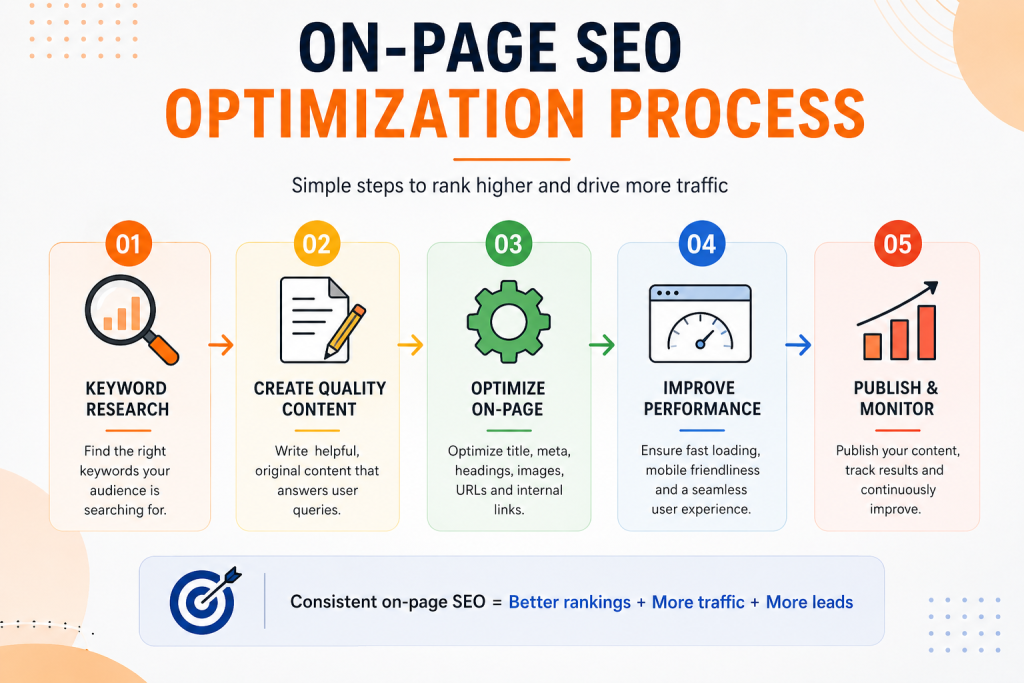
Keyword research → Search intent → Website structure → Page content → On-page optimization → Technical SEO → Internal linking → Measurement → Continuous improvement
This approach helps ensure that the website is built not only to look good, but also to be discoverable and useful.
Need Help Optimizing Your Website?
Your website may already have the content, services, and expertise needed to rank. The problem could be how those elements are structured and optimized.
WebDreams helps businesses combine website development, SEO, content, and digital marketing to build a stronger online presence.
Want to identify what’s holding your website back?
[Talk to WebDreams about your website and SEO requirements →]
Final Thoughts
On-page SEO is not a one-time task.
Search behavior changes. Competitors publish new content. Search engines evolve. Your own business and services change too.
The strongest SEO strategies therefore treat optimization as an ongoing process.
Start with search intent. Build useful content. Optimize your titles, headings, URLs, images, and internal links. Make the website technically sound and mobile-friendly. Then measure what happens and continue improving.
Most importantly, don’t optimize a page simply because a checklist says you should.
Optimize it because you want the right person to find it, understand it, trust it, and take the next step.
That is what effective on-page SEO should accomplish.