

If you have ever visited a website and immediately thought, “This looks professional,” you have already experienced good web design.
Web design is much more than choosing colours, fonts and images.
It involves planning how a website looks, feels and works for the people using it. Good web design helps visitors understand a business, navigate a website easily, find the information they need and take the next step—whether that means making an enquiry, booking a service or purchasing a product.
For businesses, this makes web design an important part of their digital presence.
In this beginner’s guide, we’ll explain what web design is, what a web designer does, the difference between web design and web development, important elements of good design, and how professional web design can help a business.
What Is Web Design?
Web design is the process of planning and creating the visual appearance, structure and user experience of a website.
It includes decisions about:
- Layout
- Colours
- Typography
- Images and graphics
- Navigation
- Buttons and calls to action
- Page structure
- Mobile responsiveness
- User experience
- Accessibility
- Content presentation
- Visual hierarchy
The objective isn’t simply to make a website attractive.
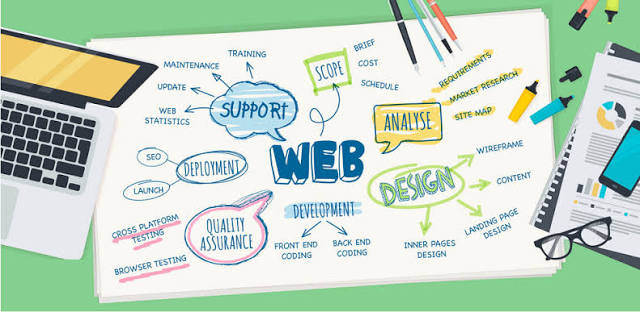
The website needs to communicate clearly and help users accomplish something.
For example, imagine a company that provides accounting services.
A visually beautiful website isn’t enough if visitors cannot quickly understand:
What does the company do?
Who is it for?
What services are offered?
How can I contact them?
Why should I trust them?
Good web design answers these questions through the structure and presentation of the website.
Why Is Web Design Important?
Your website is often one of the first places a potential customer interacts with your business.
Before contacting you, a customer may:
- Search for your business on Google.
- Visit your website.
- Look at your services.
- Check your credibility.
- Compare you with competitors.
- Decide whether to contact you.
Your website therefore isn’t simply an online brochure.
It can become part of your sales and marketing process.
Poor web design can create friction.
Visitors may struggle to find information, understand your offering or know what to do next.
Good web design removes that friction.
It makes the experience clearer.
What Does a Web Designer Actually Do?
A web designer is responsible for planning and designing the experience users have when interacting with a website.
Depending on the project, a designer may work on:
1. Website Layout
The designer decides how information should be arranged on a page.
For example:
Header → Hero Section → Benefits → Services → Proof → CTA → Footer
The layout should guide visitors naturally through the information.
2. Typography
Typography includes the selection and use of fonts.
A designer needs to consider:
- Readability
- Font size
- Line spacing
- Heading hierarchy
- Brand personality
- Contrast
Typography isn’t only about making a website look stylish.
It affects how easily visitors consume information.
3. Colours
Colours help communicate brand identity and create visual hierarchy.
For example, a website might use one colour for:
Primary CTA
another for:
Secondary actions
and neutral colours for:
Backgrounds and content.
The important thing is consistency.
4. Images and Graphics
Images can explain products, demonstrate services and make pages more engaging.
But images should have a purpose.
Adding large images simply because a page “looks empty” can hurt performance without improving the user experience.
5. Navigation
Navigation helps users move around the website.
A good navigation system should make important pages easy to find.
For a business website, that might include:
Home | About | Services | Projects | Blog | Contact
The exact structure depends on the business.
What Is UI Design?

UI stands for User Interface.
UI design focuses on the visual and interactive elements users interact with.
This includes:
- Buttons
- Forms
- Menus
- Cards
- Icons
- Colours
- Typography
- Spacing
- Input fields
- Navigation elements
For example, a button saying:
Get a Quote
needs to be visually identifiable as a button.
The user should not have to figure out whether an element is clickable.
Good UI makes interactions feel natural.
What Is UX Design?
UX stands for User Experience.
While UI focuses heavily on the interface, UX looks at the overall experience.
Imagine an e-commerce website.
A user might need to:
Find product → Compare products → Add to cart → Enter details → Pay → Receive confirmation
UX design considers whether this entire journey is easy or frustrating.
A website can have beautiful UI but poor UX.
For example:
A website may look excellent, but if users need to click through five pages just to contact the company, the experience isn’t particularly good.
This is why professional web design needs to consider both appearance and usability.
Web Design vs Web Development: What’s the Difference?
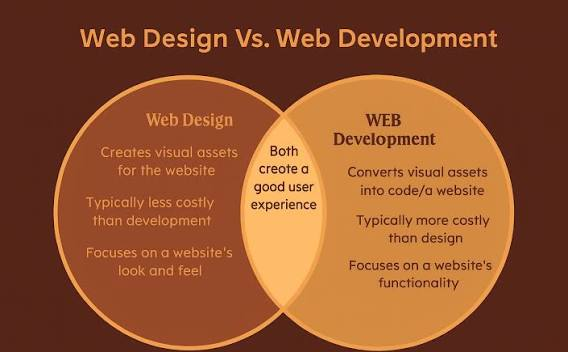
These terms are often used together, but they aren’t exactly the same.
Web Design
Web design focuses primarily on:
- Visual appearance
- Layout
- UI
- UX
- Typography
- Colour
- User journeys
- Content presentation
Web Development
Web development focuses on building the functionality behind the design.
It can include:
- HTML
- CSS
- JavaScript
- PHP
- Databases
- APIs
- Content management systems
- E-commerce functionality
- Backend systems
A simple way to understand it is:
Web design decides how the website should look and how users should experience it.
Web development turns that design into a functioning website.
In professional projects, designers and developers often work closely together.
What Makes a Good Website Design?
A good website doesn’t necessarily need to be complicated.
In fact, some of the best websites are relatively simple.
Here are some important characteristics.
1. Clear Visual Hierarchy
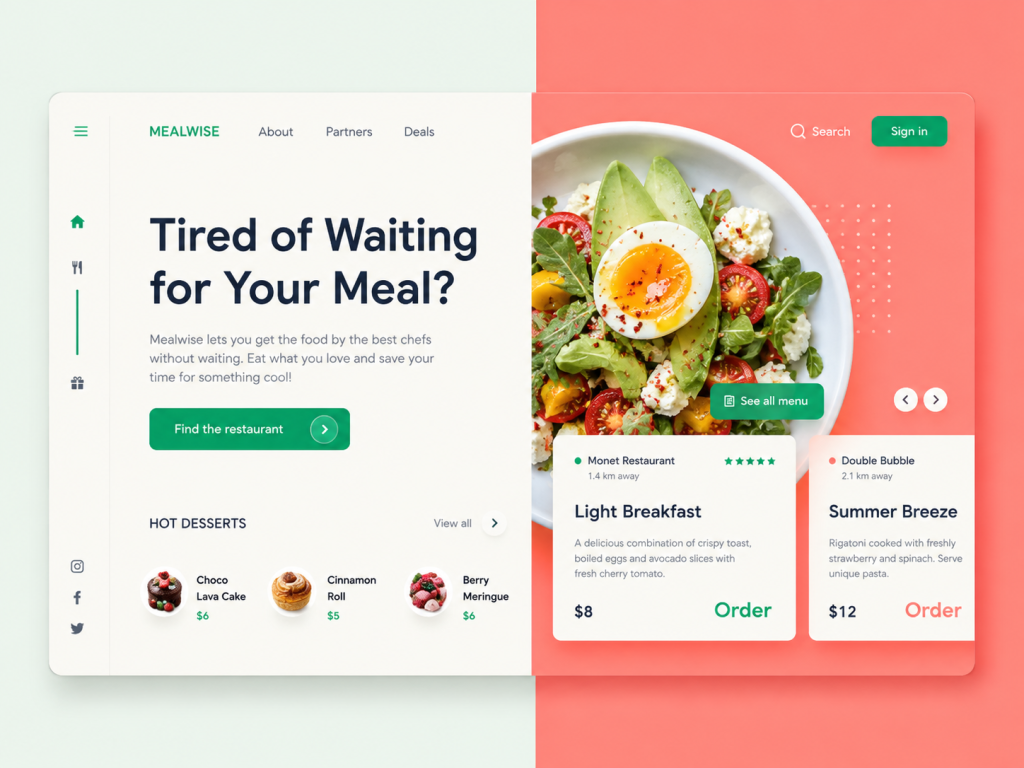
Visitors should immediately understand what is most important on the page.
For example:
Main headline
↓
Supporting explanation
↓
Primary CTA
↓
Additional information
Visual hierarchy helps users scan rather than forcing them to read every word.
2. Mobile-Friendly Design
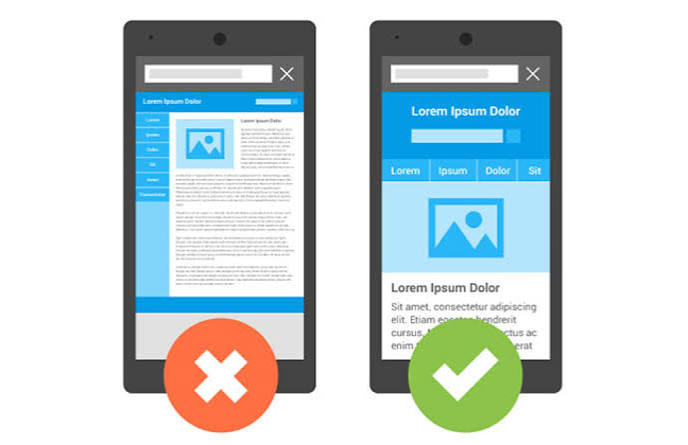
People access websites using smartphones, tablets, laptops and desktops.
A website should adapt to different screen sizes.
This is known as responsive web design.
A responsive website adjusts elements such as:
- Layout
- Images
- Navigation
- Text
- Buttons
- Columns
based on the device being used.
Mobile responsiveness is no longer an optional feature for most business websites.
3. Fast Loading
A beautiful website that takes too long to load can still provide a poor experience.
Large images, unnecessary scripts, excessive animations and inefficient code can affect performance.
Good web design therefore needs to consider performance from the beginning.
Design and performance should not be treated as completely separate concerns.
4. Easy Navigation
A visitor shouldn’t have to search for basic information.
Important pages should be easy to find.
For a service business, visitors may expect to quickly find:
- Services
- About
- Portfolio
- Testimonials
- Contact information
The navigation should reflect what users actually need.
5. Clear Calls to Action
A website should give visitors a next step.
Examples include:
Get a Quote
Book a Consultation
Contact Us
Request a Demo
Shop Now
Download Guide
A CTA shouldn’t simply exist because every website needs a button.
It should correspond to the action you want the visitor to take.
Web Design Should Be Built Around the User
One of the biggest mistakes in web design is designing entirely around what the business wants to say.
Businesses often want to put everything on the homepage:
- Company history
- Every service
- Every product
- Every award
- Every certification
- Every paragraph of information
The result can be overwhelming.
Instead, ask:
What does the visitor need to know at this point?
A good website progressively provides information.
For example:
First
What do you do?
Then
Why should I care?
Then
Why should I trust you?
Finally
What should I do next?
This creates a much more natural user journey.
The Role of Content in Web Design
Design and content should work together.
A designer can create an excellent layout, but if the content is unclear, the website can still fail.
For example:
“Innovative solutions for tomorrow’s digital transformation.”
sounds professional.
But it doesn’t tell the visitor much.
Compare that with:
“We build fast, mobile-friendly websites for small and medium-sized businesses.”
The second statement is much easier to understand.
Good web design therefore involves more than visual elements.
It involves how information is communicated.
How SEO Fits Into Web Design
SEO should not be something added after a website is finished.
The structure of a website can influence how easily search engines understand and crawl it.
Web design and SEO can work together through:
- Clear heading structure
- Logical navigation
- Descriptive URLs
- Mobile-friendly layouts
- Fast-loading pages
- Internal linking
- Optimized images
- Accessible content
- Clear page hierarchy
For example, a website’s structure might look like:
Home
→ Services
→ Web Design
→ Web Development
→ SEO
→ Digital Marketing
This creates logical relationships between different areas of the website.
WebDreams also treats SEO as part of the website structure rather than something that should simply be added at the end. You can read our guide on On-Page SEO and how we approach website optimization to understand this approach.
What Is Conversion-Focused Web Design?
A website can look fantastic and still fail to generate business.
This is where conversion-focused web design becomes important.
The design should support the business objective.
For example, if your objective is to generate leads, the website might need:
- Strong service pages
- Clear benefits
- Trust signals
- Testimonials
- Case studies
- Contact forms
- Click-to-call buttons
- WhatsApp integration
- Clear CTAs
The design should make it easier for the right visitor to take action.
This doesn’t mean adding a CTA after every sentence.
It means creating a clear path from:
Problem → Solution → Trust → Action
Common Web Design Mistakes
1. Designing Only for Desktop
A website can look perfect on a large monitor and terrible on a smartphone.
Always consider mobile users.
2. Too Much Information
More content doesn’t automatically mean more value.
Give users the information they need when they need it.
3. Too Many Colours
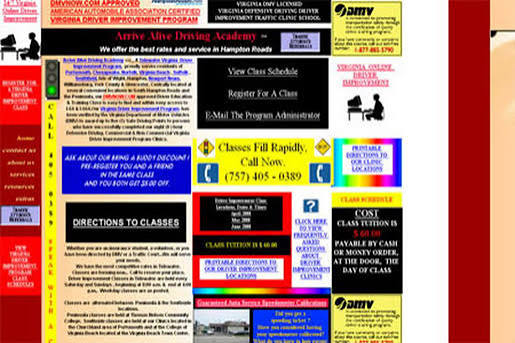
A website with too many competing colours can look inconsistent.
A defined colour system usually creates a stronger visual identity.
4. Poor Typography
Tiny text, poor contrast and inconsistent heading sizes make websites harder to read.
5. Weak Calls to Action
If visitors don’t know what to do next, you are creating unnecessary friction.
6. Copying Competitors
Looking at competitors can provide inspiration.
But copying another company’s website can prevent your own brand from developing a distinctive identity.
7. Ignoring Website Speed
Heavy images and unnecessary animations can negatively affect the user experience.
8. Treating Design as Decoration
This is perhaps the biggest mistake.
Design should solve problems.
It should help users understand, navigate, trust and act.
What Is the Web Design Process?
A professional website project usually involves several stages.
Step 1: Discovery
Understand:
- Business goals
- Target audience
- Competitors
- Services
- Brand
- Website objectives
Step 2: Information Architecture
Plan the pages and website structure.
Step 3: Wireframing
Create basic layouts before focusing heavily on visual styling.
Step 4: UI Design
Develop:
- Colours
- Typography
- Components
- Images
- Visual hierarchy
Step 5: Development
Turn the approved designs into a working website.
Step 6: Testing

Check:
- Mobile responsiveness
- Forms
- Links
- Browser compatibility
- Performance
- Navigation
Step 7: Launch
The website is deployed and made available to users.
Step 8: Improvement
A website shouldn’t necessarily be considered finished forever.
Analytics, customer feedback and business performance can reveal opportunities to improve the experience.
How Much Does Web Design Cost?
There isn’t one fixed price for web design.
The cost depends on factors such as:
- Number of pages
- Design complexity
- Customization
- CMS requirements
- E-commerce functionality
- Integrations
- Content requirements
- SEO requirements
- Development requirements
- Ongoing maintenance
A simple business website will naturally require a different investment from a large e-commerce platform or custom web application.
Instead of choosing a web design company based only on the lowest price, businesses should consider the value and purpose of the website.
A website that costs less but generates no enquiries can ultimately be more expensive than a well-planned website that supports business growth.
How to Choose a Web Design Company
If you’re planning a new website, look beyond screenshots.
Ask the agency:
Do they understand your business?
A designer should understand what you’re trying to achieve.
Do they understand your audience?
Your website should be designed for your customers—not just for the business owner.
Do they consider SEO?
A website should have a strong foundation for search visibility.
Do they design for mobile?
Responsive design should be part of the process.
Do they consider conversions?
A business website should have a clear path toward enquiries or sales.
Can they handle development?
Design and development need to work together.
Do they provide support?
Websites need updates, maintenance and improvements over time.
WebDreams has been providing web design and related digital solutions since 2001, and its current web design work emphasizes responsive, SEO-friendly and conversion-oriented websites.
Web Design Is More Than Making a Website Look Good
A beginner may think web design means:
Colours + Fonts + Images + Layout
Those things are certainly part of it.
But professional web design goes much further.
It combines:
Strategy + UX + UI + Content + Branding + SEO + Performance + Conversion
The best websites don’t simply look good.
They help users understand the business.
They make information easier to find.
They build trust.
They reduce friction.
And, most importantly for businesses, they can help turn website visitors into enquiries and customers.
Build a Website That Works for Your Business
Your website should do more than exist online.
It should represent your brand, communicate your value and give customers a clear reason to take the next step.
At WebDreams, we combine web design, development, SEO and digital marketing to create websites designed around both user experience and business objectives.
Whether you’re launching a new business, redesigning an outdated website or trying to improve an existing website’s performance, the right design can create a stronger foundation for digital growth.
Ready to Build a Better Website?
Your website is often the first interaction a potential customer has with your business. Make that interaction count.
Get in touch with WebDreams to discuss a website designed around your business, your customers and your growth goals.
